It lands in spam, or reads like a mailshot.
Bulk email tools send from their servers with marketing templates and tracking. Inbox filters notice, and so do people.

OutreachSheet is a Google Sheet for personal cold and warm emails from your own Gmail. It sends at your pace, follows up and sorts the replies for you. Pay once.
3,242 venues. 400 replies. 108 potential deals. One Gmail account.Lightopia's own outreach, run on the sheet you're buying.
Launch prices for the first 50 buyers.
 Inbox 0
Sent 48
Spam 0
Inbox 0
Sent 48
Spam 0
For anyone who needs replies from people who don’t know them yet.
Bulk email tools send from their servers with marketing templates and tracking. Inbox filters notice, and so do people.
Many replies come from the second or third email. But remembering who to chase, and when, falls apart after the first twenty names.
Copying, pasting, changing the name, sending, logging. The part that matters, the conversation, gets the least time.
A subscription charges you for every month you prospect, whether you send 30 emails or 3,000.
Everyone gets the same email, and you still have to work out who replied, who bounced and who asked you to stop.
Plain, personal emails from your own Gmail, in your own words, with each person’s name and company filled in. No marketing template, no tracking pixel.
A few at a time, at natural gaps, only in the hours and days you choose. Your domain’s email records are checked before you start.
Your follow-ups go out on schedule, so nobody falls through the cracks.
Replies, out-of-office messages, bounces, spam blocks and unsubscribes are sorted for you. You get a short report every evening.
Anyone who asks to stop is never emailed again, even if they turn up in a list you import later. It understands opt-outs in 16 languages.
Put everyone in one list. Each person gets the version you wrote for their country: French for France, German for Germany, English for everyone else.
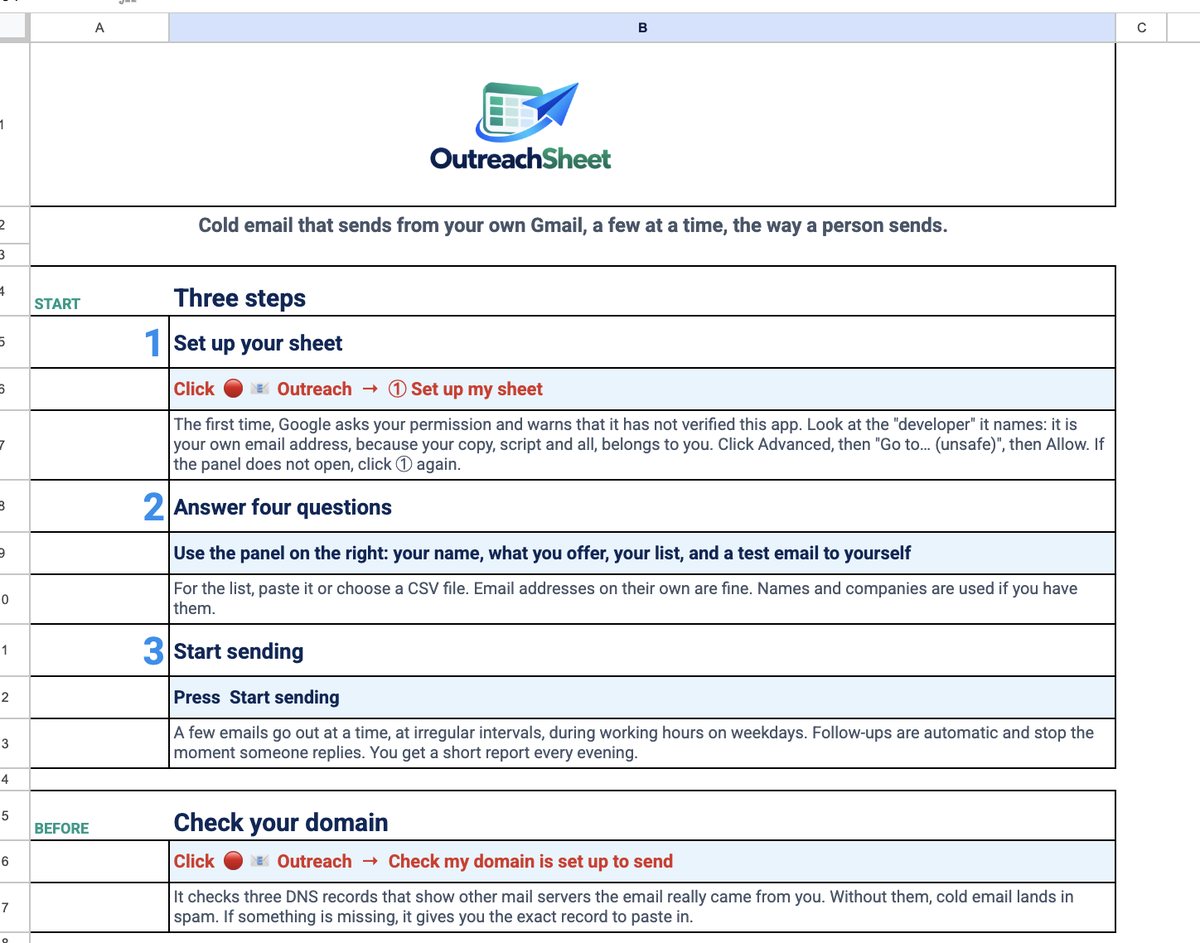
Open your link and click Make a copy. It’s a Google Sheet in your own Drive.
Your name, what you offer, your list (paste it or import a spreadsheet) and a test email to yourself. You see your first email exactly as your prospect will.
Try it in test mode first. Then it sends on your schedule and emails you a report every evening.
One Google account and a list of people to contact? OutreachSheet gives you the sending, follow-ups and reply sorting for one payment. Compare that with the extra infrastructure and features a subscription buys.
Swipe across the table on a small screen. Prices checked 18 October 2026; competitor prices are in US dollars.
| What matters | OutreachSheet | Instantly | lemlist | GMass |
|---|---|---|---|---|
| How you pay | £29 / £79 / £129 once at launch | Growth: US$47/month. Hypergrowth: US$97/month | Email: US$69/month, or US$55/month with yearly billing | Premium with follow-ups: US$39.95/month, or US$349/year |
| Your campaign workspace | A Google Sheet you own, in your Google account | Hosted campaign platform with imported contacts | Hosted campaign platform with connected mailboxes | Gmail extension backed by GMass services |
| Where campaign data is handled | List, templates and logs in your Google account; no OutreachSheet campaign server | Campaign data managed in Instantly | Campaign data managed in lemlist | Gmail/Sheets plus GMass servers, which store recipient addresses |
| Sending workflow | Apps Script and Gmail API, from your own Gmail or Workspace account | Connected sending accounts, with mailbox rotation | Connected Google, Microsoft or other providers; Gmail uses the Gmail API | Gmail integration, with an optional external SMTP service |
| Automatic follow-ups | Up to four steps; a detected reply stops the sequence | Sequences with a stop-on-reply setting | Campaign sequences | Included in Premium and Professional; excluded from Standard |
| Deliverability tools | Built-in SPF, DKIM and DMARC checks; paced sending; no warm-up pool | Mailbox warm-up; separate inbox-placement plans available | Warm-up and deliverability hub | Spam Solver included in the listed plans |
| Getting started | Copy the sheet, authorise Google, answer four questions and test | Connect accounts, import contacts and configure a campaign | Connect a provider and configure a campaign | Install the extension, authorise Gmail and configure a campaign |
| Best reason to choose it | Personal outreach from one Google account, with no recurring OutreachSheet fee | Running outreach across multiple mailboxes | Email outreach with a path to multichannel campaigns | Working inside Gmail with tracking, testing and advanced campaign options |
Your prospect list, templates, replies and campaign records live in your Google account. You do not upload the campaign to an OutreachSheet server. Google processes the sending and storage.
Plain, personal emails from your own address. Your schedule, your follow-ups and your reply sorting, with no open-tracking pixel. Check your domain’s email records before you start.
Start with a £29 launch purchase. The licence for that copy does not expire, and there is no OutreachSheet subscription. Guided setup and Ready to send add help, not a monthly fee.
Launch prices apply to the first 50 buyers; packages are £49 / £99 / £149 afterwards. Version 1 fixes are free; major new versions may be sold separately. Google account costs and sending limits still apply.
For scale: twelve months of Instantly Growth paid monthly is US$564; Hypergrowth is US$1,164. Yearly billing may cost less; mailbox, domain, data and add-ons cost extra where applicable. GMass Standard is US$29.95/month and excludes follow-ups. Sources: Instantly plans, lemlist plans, GMass pricing, GMass data handling, lemlist Gmail connection.
Why choose OutreachSheet over Instantly? →Read the full comparisons →
| Feature | Mailchimp | Brevo | GMass | By hand | OutreachSheet |
|---|---|---|---|---|---|
| Sends from your own Gmail | No | No | Yes | Yes | Yes |
| Personal emails, not a mailshot | No, built for newsletters | No, built for newsletters | Yes | Yes | Yes |
| Made for cold outreach | No, expects opted-in contacts | No, expects opted-in contacts | Yes | Yes | Yes |
| Automatic follow-ups | Yes | Yes | Yes (Premium) | You remember | Yes |
| Replies sorted for you | Opens and clicks instead | Opens and clicks instead | Yes: replies, bounces and delays | No | Yes, by type |
| Sends at a person’s pace, in your hours | All at once, or at one scheduled time | All at once, or at one scheduled time | Yes, with throttle settings | Slowly, by hand | Small batches at natural gaps, by default |
| No tracking pixel | Open tracking on by default | Open tracking on by default | On by default (can be switched off) | None | None, by design |
| Unsubscribe replies understood, in 16 languages | Unsubscribe link | Unsubscribe link | Unsubscribe link and Gmail unsubscribe button | You read each one | Yes: “désabonner”, “abmelden”, “取消订阅” go straight to Do Not Contact |
| Where your list lives | On Mailchimp’s servers | On Brevo’s servers | Your Gmail and Sheets, via GMass’s servers | Your inbox | In your own Google Drive. No OutreachSheet server |
| Several languages in one campaign | Possible, if you build conditional blocks for every language into every email | Possible, if you set display conditions for every language in every email | Possible, if you write conditional content for every language into every email | One email at a time | Built in. Write each language once; each person’s country picks it. Follow-ups stay in their language. No limit on languages. |
| Cost per year, smallest list | from £183 | from £140 | US$349 / user | Your time | From £29, once |
| Cost per year, 5,000 contacts | £914 | Rises with emails sent | US$349 / user | Your time | From £29, once |
Mailchimp and Brevo prices checked on 15 October 2026; GMass prices checked on 17 October 2026. Plans compared: Mailchimp Standard (£15.23 a month up to 500 contacts; £76.13 a month for 2,501–5,000), Brevo Standard (from £11.67 a month billed yearly, at 5,000 emails a month; sending volume and contact limits apply) and GMass lists prices in USD: Premium is $29/month or $349 paid annually per user; Standard is $20/month or $249 annually and does not include sequences/follow-ups. Professional is $49/month or $599 annually. GMass prices are not converted to GBP. Mailchimp costs are monthly prices multiplied by 12; annualised figures are rounded to the nearest pound. Mailchimp and Brevo charge more as your list or sending grows. OutreachSheet costs the same whatever the size of your list: £29 for Do it yourself at launch, £49 after the first 50 buyers. Gmail and Apps Script sending limits still apply.
Language features: Mailchimp conditional blocks, Brevo display conditions and GMass conditional content. OutreachSheet selects your prepared sequences using its editable country mapping. GMass documents unsubscribe links and email-client unsubscribe buttons.
“The replies came back, because people could see a real person had written to them.”
Ian XiangFounder of Lightopia and OutreachSheet
Lightopia's own outreach, measured 21 October 2026. Your results depend on your list and your offer.
I run Lightopia, a lantern festival brand, and most of my deals start with an email to someone who has never heard of me.
I tried Mailchimp, Brevo and GMass. None of them suited me. It wasn’t only the monthly fee. My emails didn’t land in the inbox, and few people opened them.
So I went back to sending from my own Gmail, by hand, like a person. The replies came back, because people could see a real person had written to them. But it took hours every day, and follow-ups slipped.
Mail merge sped things up, but every email was the same and I couldn’t see what came back. So I built my own, inside a Google Sheet: personal emails from my own Gmail, follow-ups on schedule, and every reply sorted.
Along the way I found one more thing. Writing to people in their own language made a big difference, so the sheet does that too.
From one ordinary Gmail account it reached 3,242 venues in 31 countries. 400 wrote back, one in three of them to a follow-up nobody had to remember, and 108 became potential deals.
If you send a lot of outreach, I hope it saves you the hours it saved me.
Ian XiangFounder of Lightopia and OutreachSheet
Every package includes the full sheet, with no subscription and nothing to renew. Choose how much help you want getting started.
Launch prices for the first 50 buyersYou’re happy following a short setup guide.
£49after launch£29one payment
You’d like someone beside you the first time.
£99after launch£79one payment
You want it set up for you, with your list and your first emails.
£149after launch£129one payment
Limited to 5 setups a week
Crossed-out prices apply after the first 50 buyers.
Your copy link arrives straight after payment. A copy can't be handed back, so sales are final, but if OutreachSheet doesn't work as described and we can't fix it, you get your money back. If we can't deliver a setup session you've paid for, the setup part is refunded.
A lifetime licence for one user or business. Your copy never expires. Fixes to version 1 are free; major new versions may be sold separately. Secure checkout. Setup sessions run on Google Meet; you stay signed in to your own account and we never ask for your password.
Still unsure? Email support@outreachsheet.com
No tool can promise that. OutreachSheet gives you the best chance: plain email from your own account, no tracking pixel, sent gradually, and a check of your domain’s email records. Your list and your message do the rest.
No, it works with a free Gmail address. But email from your own business domain (Google Workspace) is trusted more and tends to get more replies, so use one if you can. The domain check tells you whether it’s set up correctly.
Google lets a script send to about 100 people a day from a free Gmail account and about 1,500 from Google Workspace. OutreachSheet starts at a careful 30 new people a day, plus follow-ups, and you can raise it within your account’s limits. See Google’s current Apps Script quotas.
When you make your copy, the script inside becomes yours, so Google names your own email address as the developer. It shows this warning for any spreadsheet script that hasn’t been through its review for published apps. The script runs in your Google account using Google services; there is no OutreachSheet sending server. The manual walks you through each screen.
Yes. Most of what it does (personal emails from your Gmail, follow-ups, reply sorting, unsubscribes) has nothing to do with language. The language feature simply stays out of your way.
No. If you sell abroad, you write each language once (or have it translated), and the sheet sends the right version to each person. It comes with English and French ready to go.
Your list, emails, replies and logs are stored in your Google account and processed by Google services. There’s no OutreachSheet sending server.
It depends on who you email and where. In the UK, you can email companies if you offer an opt-out; emailing individuals, including sole traders, needs their consent. OutreachSheet handles opt-outs and keeps the record. You’re responsible for your list. This isn’t legal advice.
Your licence never expires, and fixes to version 1 are free. If version 1 ever stops working as described, for example because Google changes something, you’re emailed a corrected copy link at no charge. Major new versions with new features may be sold separately.
Sales are final once your copy link is sent, because a copy can't be handed back. If it doesn't work as described and we can't fix it, you get your money back. If we can't deliver a setup session you've paid for, the setup part is refunded. Email support@outreachsheet.com if anything is unclear before you buy.
Do it yourself if you're comfortable following a short setup guide. Guided setup if you'd like someone with you the first time. Ready to send if you'd rather hand over your list and offer and have it prepared for you. All three include the same sheet.
After you buy, you book a time. On a Google Meet call you share your screen and do the clicks, staying signed in to your own Google account, while we guide you. We never ask for your password. With Ready to send, you share your copy with us beforehand so we can prepare your list and first emails; on the call you approve Google's permissions and press Start yourself, so every email goes from your own account.
No. Gmail and Google Workspace only.
Launch prices for the first 50 buyers. Pay once, yours for life.
Practical guides for cold and warm outreach, whether you work in one language or several.
See the START HERE page, an example message and the settings to check.
01 · Follow-upsPlan a sequence, set the gaps and take over when someone replies.
02 · Google SheetsCompare Gmail’s built-in option, Google’s script sample and OutreachSheet.
03 · LanguagesPrepare each language once, then let the sheet select the version.